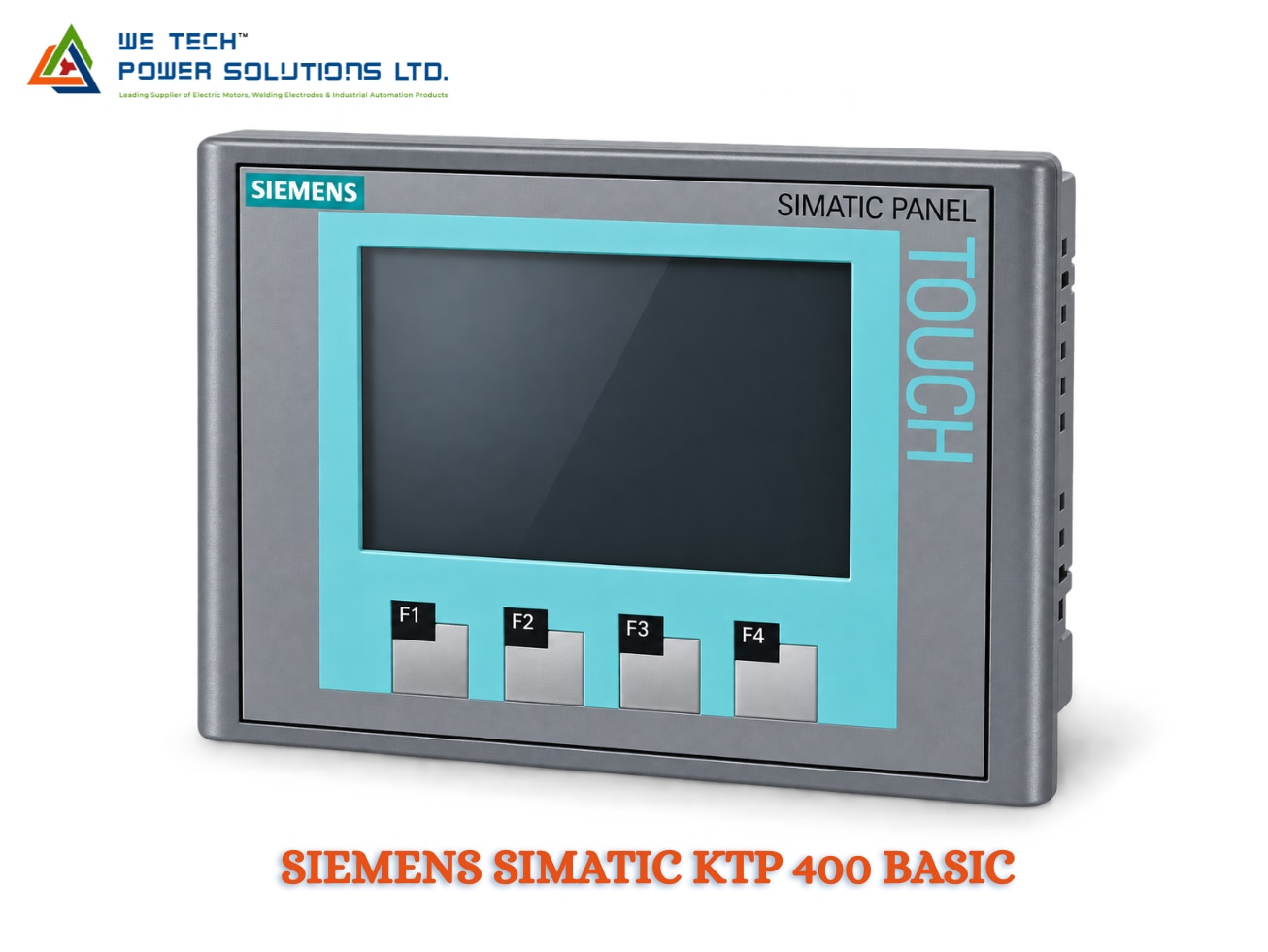
SIEMENS SIMATIC KTP 400 BASIC
Description
Siemens SIMATIC HMI KTP400 Basic
Siemens SIMATIC HMI KTP400 Basic for Compact Machine Operation
The Siemens SIMATIC HMI KTP400 Basic is a compact operator panel designed for simple machine control, monitoring and visualization applications. With its combination of touchscreen operation and physical function keys, the KTP400 Basic gives operators a straightforward interface for controlling machines and viewing essential process information.
The documented 6AV2123-2DB03-0AX0 features a 4.3-inch TFT widescreen display, 480 × 272 pixel resolution, 65,536 colors and a PROFINET interface. It is part of Siemens' Basic Panels 2nd Generation range for simple HMI applications.
We Tech Power Solutions Ltd supplies Siemens SIMATIC HMI products for OEM machines, machine builders, system integrators and industrial automation applications across Ahmedabad, Gujarat and India.
Why Choose KTP400 Basic?
Not every machine needs a large or advanced HMI. For compact equipment with a limited number of operating functions, the KTP400 Basic provides the essential visualization and control functions in a small panel.
It is suitable when you need:
• Compact machine visualization
• Touchscreen operation
• Physical function keys
• PLC communication
• Alarm display
• Basic parameter entry
• Machine-status monitoring
• Simple operator control
Its compact format also makes it useful where control-panel space is limited.
Compact 4.3-Inch Widescreen Display
The KTP400 Basic uses a 4.3-inch TFT widescreen display with LED backlighting.
Display Specifications
• Screen size: 4.3 inches
• Display type: TFT widescreen
• Resolution: 480 × 272 pixels
• Colors: 65,536
• Backlight: LED
• Backlight dimming: Supported
• Touch operation: Yes
Siemens documents the display width as 95 mm and display height as 53.9 mm for the 6AV2123-2DB03-0AX0.
The screen is suitable for displaying essential machine information such as:
• Machine status
• Production counters
• Process values
• Alarm messages
• Operating modes
• Parameters
• Basic diagnostics
Key + Touch Operation
One of the main advantages of the KTP400 Basic is its combined key and touch interface.
Operators can use the touchscreen for navigation and data entry while physical function keys can be assigned to frequently used machine commands.
The documented panel provides 4 function keys.
This operating concept can be useful for machines where operators repeatedly perform functions such as:
• Start
• Stop
• Reset
• Manual mode
• Auto mode
• Screen navigation
• Alarm acknowledgement
The actual function-key assignment depends on the HMI project configuration.
PROFINET Communication
The KTP400 Basic is designed for integration with compatible Siemens automation systems through PROFINET.
This allows the HMI to exchange information with the machine controller for:
• Process-value display
• Machine commands
• Alarm monitoring
• Status information
• Parameter handling
• Production data
A typical setup can be represented as:
Siemens PLC → PROFINET → KTP400 Basic → Machine Operator
The exact communication configuration depends on the connected PLC and HMI project.
Siemens specifically identifies the 6AV2123-2DB03-0AX0 as a PROFINET KTP400 Basic panel.
Simple Machine Visualization
The KTP400 Basic is intended for simple HMI applications, making it suitable for machines where operators need access to a limited but important set of controls and information.
A typical screen structure could include:
Machine Overview
↓
Operating Mode
↓
Parameters & Setpoints
↓
Alarms & Diagnostics
This approach keeps the operator interface focused and easy to navigate.
TIA Portal Engineering
The documented KTP400 Basic is configurable using WinCC Basic V13 / STEP 7 Basic V13.
Depending on the project generation, Siemens engineering software can be used to configure:
• HMI screens
• PLC tags
• Alarm messages
• Operator controls
• User interface elements
• Process values
• Navigation
• Basic machine visualization
For existing machines, always verify the HMI article number and project/software version before making changes or planning a replacement.
24 V DC Industrial Power Supply
The KTP400 Basic uses a 24 V DC supply, making it suitable for standard industrial control-panel power architectures.
The documented Basic Panel 2nd Generation specifications list the rated supply voltage as 24 V DC.
For installation, the actual electrical and environmental requirements should be checked against the Siemens manual for the exact article number.
USB & Service Functions
Basic Panels 2nd Generation include USB connectivity for service and practical machine-support functions.
Siemens describes the USB interface as supporting devices such as:
• Keyboard
• Mouse
• Barcode scanner
• USB flash drive
USB can also support data archiving and backup/restore functions on applicable Basic Panel configurations.
This can be useful during commissioning and maintenance.
Where Is Siemens KTP400 Basic Used?
Compact Machinery
Ideal for machines with limited panel space and relatively simple operator interfaces.
Examples:
• Small assembly machines
• Compact production machines
• Special-purpose machines
• Automated workstations
Packaging Equipment
Can be used for:
• Filling machines
• Labelling equipment
• Sealing machines
• Small packaging systems
Conveyors & Material Handling
Suitable for:
• Conveyor controls
• Transfer systems
• Small handling equipment
• Sorting machines
Pumps & Utility Equipment
Potential applications include:
• Pump control
• Utility skids
• Water-handling equipment
• Small process systems
OEM Machines
The compact form factor makes it practical for machine builders requiring a simple operator panel.
Industries
The KTP400 Basic can be considered for:
• Machine Manufacturing
• Packaging
• Manufacturing
• Material Handling
• Food & Beverage
• Automotive Components
• Textile Machinery
• Pumping Systems
• Industrial Utilities
• OEM Automation
The final selection should always be based on the machine's communication, visualization, environmental and engineering requirements.
Siemens KTP400 Basic Technical Specifications
Specification Details
Brand Siemens
Product Family SIMATIC HMI Basic Panels
Product KTP400 Basic
Generation Basic Panel 2nd Generation
Article Number 6AV2123-2DB03-0AX0
Product Type Basic Industrial HMI Panel
Operation Key + Touch
Display 4.3-inch TFT widescreen
Resolution 480 × 272 pixels
Colors 65,536
Function Keys 4
Touchscreen Yes
Communication PROFINET
Supply Voltage 24 V DC
Backlight LED
User Memory 10 MB
Engineering WinCC Basic V13 / STEP 7 Basic V13
Installation Panel mounting
The specifications above refer specifically to 6AV2123-2DB03-0AX0. Always verify the complete Siemens article number before ordering.
KTP400 Basic vs KTP700 Basic
Feature KTP400 Basic KTP700 Basic
Display 4.3' 7'
Resolution 480 × 272 800 × 480
Operation Key + Touch Key + Touch
Function Keys 4 8
Best For Compact machines Larger machine interfaces
Communication PROFINET PROFINET / model-dependent
The KTP400 Basic is preferable when compact size and simple operator control are the priority, while the KTP700 Basic provides more screen area for machines with greater visualization requirements. Siemens documents both within the Basic Panel 2nd Generation family.
When Should You Choose KTP400 Basic?
Choose the KTP400 Basic when:
• The machine has limited panel space
• Only essential machine data needs to be displayed
• Four physical function keys are sufficient
• Touch operation is required
• A PROFINET connection is required
• The application does not need advanced Comfort HMI functions
• A compact operator interface is preferred
For applications requiring more screen space, advanced visualization or broader functionality, consider a larger Basic Panel, Comfort Panel or current Unified Basic Panel.
KTP400 Basic Replacement & Upgrade Considerations
For an existing machine, do not select a replacement based only on screen size.
Before replacing the HMI, check:
• Existing Siemens article number
• PLC model
• PROFINET configuration
• HMI project
• TIA Portal / WinCC version
• Panel cutout
• Power supply
• Mounting arrangement
• Required function keys
• Product lifecycle
Siemens' newer SIMATIC HMI Unified Basic Panels should also be evaluated for new machine designs where their features and engineering environment are appropriate.
Siemens KTP400 Basic HMI Supplier in Ahmedabad & India
We Tech Power Solutions Ltd provides Siemens automation product sourcing and HMI selection support from Ahmedabad, Gujarat.
We can assist with:
• Siemens KTP400 Basic sourcing
• Article-number verification
• HMI selection
• PLC-HMI compatibility
• Replacement and retrofit requirements
• TIA Portal compatibility considerations
• Communication selection
• Industrial automation quotations
We support customers across Ahmedabad, Gujarat and India, with industrial automation enquiries from UAE, Dubai, Abu Dhabi, Saudi Arabia, Qatar, Oman, Kuwait and Bahrain.
Why Choose We Tech Power Solutions Ltd?
• Siemens automation product sourcing
• HMI selection assistance
• Exact MLFB verification
• PLC-HMI integration guidance
• Replacement support
• OEM automation assistance
• Industrial automation product sourcing
• Ahmedabad-based support
• Pan-India supply coordination
Frequently Asked Questions
What is Siemens KTP400 Basic?
The SIMATIC HMI KTP400 Basic is a compact Siemens Basic Panel with key/touch operation, a 4.3-inch TFT display and PROFINET communication. The documented article number is 6AV2123-2DB03-0AX0.
What is the screen size of KTP400 Basic?
The KTP400 Basic has a 4.3-inch TFT widescreen display with 480 × 272 pixel resolution and 65,536 colors.
Does KTP400 Basic have physical keys?
Yes. The KTP400 Basic combines a touchscreen with 4 physical function keys.
Which communication interface does KTP400 Basic use?
The documented 6AV2123-2DB03-0AX0 uses PROFINET for communication with compatible automation systems.
Which software is used for KTP400 Basic?
The Siemens product listing specifies configuration from WinCC Basic V13 / STEP 7 Basic V13 for the documented article. For existing projects, verify the exact hardware and engineering-software version before configuration.
Get Siemens SIMATIC HMI KTP400 Basic
Looking for a Siemens SIMATIC HMI KTP400 Basic in Ahmedabad, Gujarat or India?
Share your Siemens article number, PLC model, required quantity, application and communication requirementwith We Tech Power Solutions Ltd for product identification, selection assistance and quotation support.